Loish
patreon
Time for this month’s tutorial: drawing environments in procreate! I’ve done an environments tutorial in the past, but it was focused on my workflow in photoshop. While it is possible to replicate that same workflow in procreate, I tend to take a different approach, mainly because I prefer to work with textured brushes on the iPad since it is so intuitive and responsive!
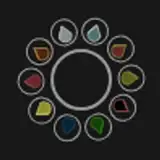
Because this workflow is all about those brushes, I made a list of the brushes I used to draw this study. I do want to emphasize that there is no need to use these specific brushes for your environment art. What I want to show you with my process is that you can experiment with all kinds of brushes to get the effect you want, which includes default procreate brushes or brushes you make yourself! There’s no need to purchase these if you don’t want to spend the money on them. But I do find them helpful in my own process, so here’s a little visual guide plus a list:

From the MaxPacks Gouache set (https://maxpacks.com/gouache-maxpack):
• Gouache Clean - I’d say I use this one most of the time, since it’s the most intuitive brush for me.
• Gutterpunk - this one is great for texture and you’ll see me use it in different ways.
• Bristle Gritty - also great for texture and also soft shading that can later be blurred into a gradient.
• Detail Gritty - I use this one for adding final details towards the end.
• Wet (I call this ‘gouache wash’ in the tutorial)- this is a softer brush that I use for the sky from time to time.
• Dry brush - this one was used for the ripples at the end.
From the RazumInc pro II set (http://cbr.sh/ai2y9?ref=loish):
• Shade upd 1 - this one worked great for getting some atmospheric mist in the distance.
• Idea bra II - this one creates interesting interrupted lines.
• Canvas border II upd - this was the twisty brush that I drew the cloud wisps with.
• Geometric sketches R - I tried this one for the water ripples but got rid of those strokes in the end because they felt too smooth.
From the Macalabs procreate set (http://cbr.sh/sndsf0?ref=loish):
• Leyendecker - this brush created some nice scratchy lines that i could use for the water ripples.
From procreate default brushes (from the ‘painting’ category of brushes):
• Nikko Rull - this was a square textured brush that worked nicely to create some large brush strokes for the sky and a few other things.
• Turpentine - this also gave a nice textured scratchy effect for the water.
Here’s the post showing the final artwork and the reference image in case you want to give it a try yourself! Hope you enjoy this one and as always, feel free to post any questions you may have!

I've been trying to tackle environments, one element at a time and it's so frustrating that most tutorials I see online are folks using photoshop and the lasso tool. I really wished Procreate's lasso tool would make some nice rounded shapes rather than wobbles whenever I try following other workflows. I'm trying to go for a bit more stylization and detail in my pieces (think of Izzy Burton), but constantly get lost with brushes, not really knowing how to pick one that can mimic a certain effect. Loish, I know you don't work much in Procreate or with landscapes but I was wondering if you had any recommendations for artists that are creating tutorials on environments in Procreate?
I loved this tutorial cause I’ve been struggling with environmental studies and this helped so much! Thank so much Loish!
thanks jacob! glad you liked it! i struggle a bit with the lasso in procreate. but I think i just need to get used to it!
Hey Loish, working my way through your tutorials and this was a great watch. I work primarily in Procreate so this was great for me and environments are always a challenge. I'm curious why you didn't use the selection tool in place of the lasso though? In my experience they work pretty much the same way
hey simkin! i have definitely discussed this with procreate many times but sadly they choose not to implement it for some reason. for now the workarounds are the only option available! on the upside, their brushes have really intuitive pressure sensitivity and you can easily mimic the look and feel of a gradient with the brushes.
Hi Loish! Thank you so much for making these videos. I know they take time. You're a wonderful artist but also a great teacher. I think that's a rarity. Have a request! You have a lot of influence - is there any way you can get PROCREATE to add a GRADIENT TOOL like we have in photoshop? Have you ever requested that? There are gradient tool workarounds for the app, but it's just not as intuitive as the one in photoshop.
This tutorial helped me so much!
ty <3
hey! It should be fixed now, be sure to refresh the cache as well before you watch (ctrl + F5) so that the right video loads! let me know if you have any issues watching it!
that's so frustrating! the video isn't visible at all for me, this one definitely needs fixing. I'll reach out to patreon about it!
Actually I can't see it even on the browser :c
the video vanished as I was half-way done following along. Just my luck!
glad it's helping! i definitely relate to this, my character workflow doesn't translate well to other stuff and I've really had to make a mental shift when drawing environments. good luck painting ~ once you find a new workflow, it gets so much more enjoyable!
Wow I'm far behind on Patreon stuff lol. Finally watched this! I love your environments but lasso + gradient doesn't work really at all for my painting style, so I was hoping for an environments tutorial that involved more brushwork, and here we are! It's super helpful!! I have a bad habit of trying to start with all local color first in backgrounds the same way I would with a cell shaded character piece, and it REALLY does not work well and I've been extremely frustrated with it so far. I'm definitely going to be trying out this method in the future. Even just after watching this I was able to go 'ah, not enough random detail!' and add some quick texture to an environment painting I'm currently working on and it looks MILES better already. Now I just gotta figure out how to handle the super-close-up details in the foreground >_< I'll figure it out yet! Thank you so much for this <3
glad you found it helpful!
This was great to follow along, I don't necessarily feel happy with how mine came out but I learned so much in the process!
Thank you so much!! I really needed a tutorial on Procreate and I was curious about your brushes!
glad you found it helpful! i use similar techniques in photoshop too sometimes, alpha lock and blur always creates some interesting effects!
Learned sooo much!! I'm using a different app but I love how I can still apply the same techniques. I can't wait to try these. Thanks, Loish!! <3
really useful tutorial, thank you! I never thought about using the motion blur… but I can see how much it adds to the process, I am definitely going to try it out
I love this. Thank you! Been waiting so long! Happy Thanksgiving!
i'm so sorry :( this is due to a recent change that vimeo implemented.
yay! it's so much fun to experiment with brushes :)
i'm so glad you enjoyed it!
I will definitely be making more procreate tutorials in the future!
happy to hear that Jill!
sorry to hear that! vimeo introduced some new security measures that conflict with the patreon app sometimes. have you tried viewing it in the browser?
welcome to this patreon! really appreciate your support :)
so glad you liked it!
Very helpful and easy to follow tutorial. Can’t wait to try this out on an environmental study that I’ve been avoiding. Watching this makes me want to tackle it head on.
Oh my oh my, finally after starting supporting you on Patreon, I am did my first tutorial paint a long. I am so looking forward to applying the knowledge to other environments. I love how you present information so much. I will definitely commit to doing all the tutorials. Thank you so much!
Mine keeps saying the video does not exist 🤷♀️
Check this one Lois did for Procreate, it's amazing :) https://www.youtube.com/watch?v=ne1KViHcYzo
Did you see this one https://youtu.be/CNjr3XUKfVw ?
Hi lois. This was fantastic thank you so much. ❤️
Thank you for making more procreate tutorials ♥️♥️♥️i hope that there will be more procreate tutorials in the future they are so helpful /can you do more portrait painting tutorials on procreate next month???
Thank you for this tutorial!! I painted along with the video and then tried a landscape immediately after and found SO MANY ways to apply what you taught!!! It was actually a repaint of something i had done a could years ago and not only did i complete it more quickly, it looks a thousand times better. Incredible. Seriously. I can't wait to apply these methods all the time!
So magical 🥰🥰 i love these methods 💪✨
This tutorial gave me HOURS of fun playing with brushes even before I watched it. I’m expecting many more hours of fun trying out the methods you showed on a couple environmental studies of my own.
For some reason the video keeps saying it doesn’t exist if you click on mobile. So if someone else has this issue it works when you go to Patreon on the browser for some reason.
Thank you! Just what I was waiting for 😍
So excited!!! Evening plan 😍😍😍