calm
patreon
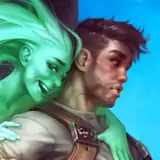
I got an iPad Pro recently, hoping it will encourage me to do more sketching, and enable me to doodle the ideas I get while I'm relaxing and too lazy to sit at my desk and draw. So here's a short time-lapse video for you guys of something relatively simple I did tonight in an attempt to get comfortable with Procreate.
Drawing on the iPad feels a bit weird and takes some getting used to. The screen is very nice and crisp compared to my Cintiq though! And I like the thin pen a lot, though it's all hard plastic, so the fingertips can hurt a little after a while.
After getting a bit used to the tools in Procreate, it's a nice drawing software, especially for sketching. I still miss a lot of PS features while working though. It kind of forces me into a simpler workflow than I'm used to, which, while a little bit frustrating sometimes, isn't necessarily only a bad thing.


Yeah, it's nice! I like the color blending settings they added for brushes in the latest version.
Oooh, very nice. I love ProCreate. It's a pretty solid app and the only one that I've actually enjoyed using out of the few that I've tried on my iPad.
It's not impossible he'll show up in a thumbnail sketch at some point! I'm trying to sketch some more ideas for characters, creatures, and environments I imagine being in the world my characters are in. One of the environments I have some ideas for is the type this guy would fit into. So... we'll see. :)
This is really cool, I love the stylised anatomy that you've given him, very nice work 😄. Maybe we'll see him featured in a full painting with a lady at some point 😉.
Those hard chairs in highschool must not have been fun for that guy.
I'm glad you like it! At the end I just used a large soft airbrush with different colors on a few layers with different blending modes on them. Specifically, Normal and Overlay layers below the character, and Multiply on a layer on top of the layer stack to fade the bottom of the picture into shadow. Does that answer your question? I'd be happy to elaborate a bit if you need me to. :)
Oh my gosh, that was really beautiful and uplifting to watch! What on earth did you do at the end though, with the background? I am struggling to learn ProCreate myself, and keep running back to my comfort zone in clip studio...