KamiGato
patreon
UPDATE - HOTFIX 24.08.20
Something went terribly wrong while packing up this scene for you. The result was a pretty confusing walk through unsorted files. This fix should resolve the problems.
Here is the new download link:
*DOWNLOAD*
So if thats not a sarcastic play with the devil it should work just fine now. Anyway please feel free to report as soon as possible if you got any error or problems! Thanks for reporting! We give our best to fix it as soon as possible. This might take some time of course because of "real life working" and different time zones.
But what happened? Well the VaM directory of our post procession rig is spread up into various folders with even more subfolders including ready mocaps, testings, drafts, sheduled, stopped ones and so on. The file has been saved on a "ready to share" path by mistake while the actual vac file went into an completely other direction.
Sorry for that fellow VaMmers!
Have a great start in this week
Gato
******************************************************************************
ORIGINAL POST 23.08.20
Do we have to say much more? Enjoy the next episode of our Patreon exclusive "Touchy-Booty-Shake Dance" series!
Have a great time!
Gato
INSTALLATION
1.) Download the following .var file if you don´t already have it and place it into your "AddonPackages" Folder
- Hunting-Succubus - EyeBall Shadow, Tear WetLine, Reflection! (DOWNLOAD ALL 3 VAR FILES!)
2.) Download the MoCap package. Drop the CG-STUDIO folder where your CG-STUDIO folder is located. Drop the Custom folder into your VaM Root directory!
More information in the "Installation + var Info" readme file.
3.) Inside VaM open up the "Touchy Booty Shake Dance Vol.3" var file and enjoy.
This MoCaps Key features
Rating: Level-A MoCap
Rating in detail: (Cons) rare "head clipping with hand" moments
(pros) great tracking and overall performance! / Sexy Dancing and partial insertion / light-show
Performer: Chrizzy
Genre: Booty / Twerk / XXX
Light: fitting lightshow
Restart: YES
Specials:
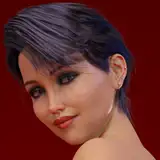
R-Line Variation Model Fareya, 21
Triggered clothing drop
Triggered fluid shots
Technical information & limitations
* Make sure to have at least 35-45 FPS in order to stay synced with the audio
* Freeze motion before scene load & let everything load up first
* Disable soft body physics if you notice big FPS drops or crashes
* Use the RESTART button with caution ( only push if model is in a similar position to the start position eg. not backwards)


Hi there. This show is down for maintenance at the moment. All availible shows are in our file archive :)
Hi, I joined recently and tried to access the link on the post but it has expired. This file is also not on the archive ? Is there anyway to get this file now ? Thanks
awesome!
BTW, I love the touchy booty series. This one is one of my faves. Loved the dancing and then the surprise sex.
Just downloaded today, and had the same issues. I just extracted the files and placed it in the save/scene folder and followed the installation instructions for the assets.
Looking at comments above, it looks like I was lucky to have waited and only downloaded the latest hotfix of this yesterday... and I had no problem at all. Great scene! Love it. Probably my new goto scene now... until your next greatest scene comes along. Things are definitely getting slicker and better. Looping, restarting working a lot better on new scenes now. No hands and arms bending behind heads any more at the loop restart point!
Link fixed
Fixed link
download links don't seem to be working
Will be fixed later today! Thanks for the heads up
Great. However, the restart button does not work. Also, it seems that the flash will not work at 77:30 seconds and 95:70 seconds if you manually return it.
MEGA links don't seem to be working. It says the link I'm trying to access is no longer available.
I Have lots of experience with VAM... .var .json .vac I know them all and the files they go into. I can't even find this file to load. I have unpacked it everywhere at this point. No idea what I am doing wrong. Old file paths and new file paths. Nothing is working.
Able to get it working by manual extraction of the .var file and placing the contents of the Share folder in \saves. The performance improvements in 1.20 really show through in this - literally every other cgstudio production falls out of sync for me if I forget to turn off soft-body physics, but in 1.20 I left it turned on and the entire routine plays smoothly
Dont worry mate. Due the vaccational break the releases for this month went further to the end. So there will be at least two more releases this week. One of them but maybe next monday. We feel sorry for the confusion within this release and will fix it as soon as possible and of course reupload the file. Gato
I tried variously, but I get a lot of errors. August is over, but I have not enjoyed any work this month.
Why does the method change every time? It's a source of confusion
Everything worked perfect from the var.
I opened the .var with 7-zip (Open Archive) . Changed "Share" into "scene" and edited the meta.json in the root with the same change for the .json and .jpg. And now I see the var in VAM.
Sorry for the confusion. As far as I can tell you need to extract the rar file first of course and place the content like adviced in the install instructions. I`ve packed it up to a rar file only for handling purpose but that seemed to go pretty wrong. There is no need to extract the var file as the var file is intended ro be read by the VAM file system itself. Well I have also noticed that since the latest update you have to restart VaM in order to update your AddonPackages folder so new var files get visible for VaM itself.
Same, can't see the .var file in VAM, had to extract it out
it is not working for me either. i inspected the package and the meta file has this an odd storage location for the scene file. i'm not sure if that is the problem or not: "Saves\\Share\\Dances\\Touchy Booty Shake Dance Vol.3\\CG-STUDIO\\Touchy Booty Shake Dance Vol.3.json"
The only way I could get this working was by extracting the JSON from the VAR method.
"Touchy-Booty-Shake Dance 3" Love it.. Was well worth all the time it took to get if working.. Great Job C&G... =]
It was that dame Share folder crap that got me... I moved it like you said Storyline and it work... thxs for the info
unzipping it and then placing it in save folder works, which was basically what I did. I just couldn't find the scene by just placing the var file in the AddonPackage folder.
That's strage. I put this var file in my AddonPackage folder but the scene doesn't show up in VaM as others do. Can't figure out why.
Everything's working great, just as the other releases! To people having issues. First make sure you have extracted the rar contents. Inside the rar, you will find install instructions, follow them, or if you have never done this before, just put the CG-STUDIO folder in your addonpackages directory like any other var.
I did unzip the file to the Vam file on my pc and I am still haven problems.. I read the install file to this over and over and I did what all it said.. I am starting to think it is the update I did.. let me know if anyone is getting this to work other than what HellowWorld said
Can someone tell me if its me or is anyone haven problems getting the var to work inside VaM? I did just do the 1.20.8 update and I am not sure if that is missing up the var unpack or what.. Let me know if anyone eles can get this to work with the 1.20.8 update..
its a rar.. you have to extract it
Can you take another look at the file? Cuz you uploaded a var file, which I put in the AddonPackages directory but couldn't find te scene in VaM. Then I changed the file's extension to vac and put it in the save directory, and this time I could find the scene all right and played it, but there was no music. I then had to go into scene edit mode and manually redirect the music link for it to play. I finally got it to work but I'm not sure everybody would be able to figure it out. It would be great if you could take another look at it. Again, as always, great scene and great work in this one, I really enjoyed it.